



Korg NanoKey Studio Controller
ID: ZMKGHSCT030003
In stock
Accumulate discounts for your card
Best price on the market


Complete your purchase!
Total inspiration
Korg NanoKey Studio Controller

The nanoKEY Studio can connect not only via USB but also wirelessly. It’s easy to connect to an iPad/iPhone music app such as KORG Gadget or Apple GarageBand, or to your Mac/Windows music production software. Liberated from annoying cables, you’ll be free to set up your system much easier than some other products. Thanks to careful tuning, you’ll enjoy low latency and high stability.

The combination of the nanoKEY Studio with KORG Gadget is the ultimate combination for mobile performance. The nanoKEY Studio supports wireless connection via Bluetooth MIDI, so your iPhone can instantly transform into a powerful music production tool. KORG Gadget has a special native mode exclusively for the nanoKEY Studio. Simply by connecting KORG Gadget, the most appropriate controls for MIDI assignment on your nanoKEY Studio are completed automatically. At home, in a coffee shop, in transit, or outdoors, you can quickly immerse yourself in making music in minimal space.

The dedicated utility "Bluetooth MIDI Connect for Mac" allows fast and simple wireless connection between your Mac and KORG Bluetooth enabled keyboard (such as the nanoSTUDIO series and microKEY Air).
This greatly simplifies the sometimes troublesome process of establishing a wireless connection, letting you easily and quickly connect whenever you want.

"Bluetooth MIDI Connect" allows you to wirelessly connect your iPhone/iPad and KORG Bluetooth enabled keyboard (such as the nanoSTUDIO series and microKEY Air) even when using an app that does not support Bluetooth MIDI.
This enables wireless connection for any app that supports Core MIDI.
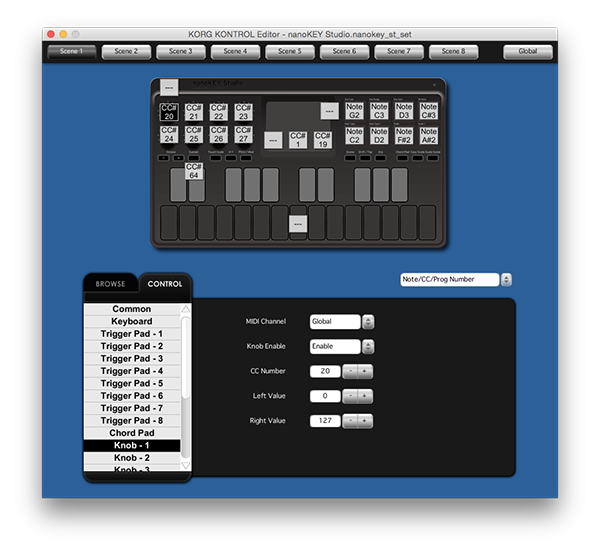
We provide “KORG KONTROL Editor” software that lets you freely customize the settings of the nanoKEY Studio. You can adjust the velocity curve of the keyboard, and customize the MIDI messages that are assigned to the pads and knobs to meet your needs.
We provide “KORG KONTROL Editor” software that lets you freely customize the settings of the nanoKEY Studio. You can adjust the velocity curve of the keyboard, and customize the MIDI messages that are assigned to the pads and knobs to meet your needs.

Even if you’re not the most skilled keyboardist, the 25 velocity-sensitive keys allows you to step-record easily. The Scale Guide function illuminates the keys to show recommended notes in the scale, making it easier to play. This is a smart keyboard with a variety of performance modes, such as the Easy Scale function, that lets you produce musical phrases using any keys.

Smaller than a sheet of letter-sized paper, you can put the nanoKEY Studio in your bag and take it anywhere. With a simple, refined, and stylish design, along with beautiful lighting with white LEDs, you won’t get tired of using it every day. With its modern design, the nanoKEY Studio is ideal for use with new devices such as your laptop, tablet, or smartphone.

The eight velocity-sensitive trigger pads will convey every dynamic nuance of your drum performance. In chord-playing mode, the Chord Scale function automatically assigns the best chords for the key and scale you’ve selected, so your song will take shape at amazing speed. You can also assign the pads to trigger audio clips. These pads are not limited by musical genre; they deliver all-purpose music production power.

You can use a single finger to control a software synthesizer just like you can with a Kaossilator, or control a plug-in effect the same way as a KAOSS PAD. The nanoKEY Studio features an arpeggiator with rhythm patterns, letting you generate a succession of new phrases simply by touching the pad.

The eight knobs provide versatile control of your software synthesizers, plug-in effects, and DAW mixer.

The proprietary KORG BLE-MIDI Driver now allows fast and simple wireless connection between your Windows PC and KORG Bluetooth enabled keyboard (such as the nanoSTUDIO series and microKEY Air).
You can enjoy performing or producing music via an easy wireless connection not only from your iPhone/iPad or Mac, but also from your Windows PC. This is a powerful new addition to the Windows world and this driver works with Windows 8.1 and above.
The nanoKEY Studio can connect not only via USB but also wirelessly. It’s easy to connect to an iPad/iPhone music app such as KORG Gadget or Apple GarageBand, or to your Mac/Windows music production software. Liberated from annoying cables, you’ll be free to set up your system much easier than some other products. Thanks to careful tuning, you’ll enjoy low latency and high stability.
The combination of the nanoKEY Studio with KORG Gadget is the ultimate combination for mobile performance. The nanoKEY Studio supports wireless connection via Bluetooth MIDI, so your iPhone can instantly transform into a powerful music production tool. KORG Gadget has a special native mode exclusively for the nanoKEY Studio. Simply by connecting KORG Gadget, the most appropriate controls for MIDI assignment on your nanoKEY Studio are completed automatically. At home, in a coffee shop, in transit, or outdoors, you can quickly immerse yourself in making music in minimal space.
The dedicated utility "Bluetooth MIDI Connect for Mac" allows fast and simple wireless connection between your Mac and KORG Bluetooth enabled keyboard (such as the nanoSTUDIO series and microKEY Air).
This greatly simplifies the sometimes troublesome process of establishing a wireless connection, letting you easily and quickly connect whenever you want.
"Bluetooth MIDI Connect" allows you to wirelessly connect your iPhone/iPad and KORG Bluetooth enabled keyboard (such as the nanoSTUDIO series and microKEY Air) even when using an app that does not support Bluetooth MIDI.
This enables wireless connection for any app that supports Core MIDI.
We provide “KORG KONTROL Editor” software that lets you freely customize the settings of the nanoKEY Studio. You can adjust the velocity curve of the keyboard, and customize the MIDI messages that are assigned to the pads and knobs to meet your needs.
We provide “KORG KONTROL Editor” software that lets you freely customize the settings of the nanoKEY Studio. You can adjust the velocity curve of the keyboard, and customize the MIDI messages that are assigned to the pads and knobs to meet your needs.
Even if you’re not the most skilled keyboardist, the 25 velocity-sensitive keys allows you to step-record easily. The Scale Guide function illuminates the keys to show recommended notes in the scale, making it easier to play. This is a smart keyboard with a variety of performance modes, such as the Easy Scale function, that lets you produce musical phrases using any keys.
Smaller than a sheet of letter-sized paper, you can put the nanoKEY Studio in your bag and take it anywhere. With a simple, refined, and stylish design, along with beautiful lighting with white LEDs, you won’t get tired of using it every day. With its modern design, the nanoKEY Studio is ideal for use with new devices such as your laptop, tablet, or smartphone.
The eight velocity-sensitive trigger pads will convey every dynamic nuance of your drum performance. In chord-playing mode, the Chord Scale function automatically assigns the best chords for the key and scale you’ve selected, so your song will take shape at amazing speed. You can also assign the pads to trigger audio clips. These pads are not limited by musical genre; they deliver all-purpose music production power.
You can use a single finger to control a software synthesizer just like you can with a Kaossilator, or control a plug-in effect the same way as a KAOSS PAD. The nanoKEY Studio features an arpeggiator with rhythm patterns, letting you generate a succession of new phrases simply by touching the pad.
The eight knobs provide versatile control of your software synthesizers, plug-in effects, and DAW mixer.
The proprietary KORG BLE-MIDI Driver now allows fast and simple wireless connection between your Windows PC and KORG Bluetooth enabled keyboard (such as the nanoSTUDIO series and microKEY Air).
You can enjoy performing or producing music via an easy wireless connection not only from your iPhone/iPad or Mac, but also from your Windows PC. This is a powerful new addition to the Windows world and this driver works with Windows 8.1 and above.
Related
Recommendations
| 5 stars | 0% | |
| 4 stars | 0% | |
| 3 stars | 0% | |
| 2 stars | 0% | |
| 1 star | 0% |