

AlphaTheta DDJ-GRV6 DJ Controller
DJ Controller
ID: ZM105971
634 €
In stock
Estimated delivery: 17 to 30 June
Accumulate discounts for your card
Best price on the market

1

View all options and shipment methods
Complete your purchase!
AlphaTheta DDJ-GRV6 DJ Controller
634 €
Pioneer HDJ-X5-K Headphones
67,48 €
AlphaTheta DDJ-GRV6 DJ Controller
634 €
Pioneer VM-80 Black Studio Monitor
227 €
AlphaTheta DDJ-GRV6 DJ Controller
634 €
Electro-Voice ND76 Voice Microphone
114 €
Description
Videos
Accessories
FIND YOUR GROOVE: Introducing the DDJ-GRV6
Features
4-channel mixer
check_circle_outline
The mixer section has 4 channels, so you can create mashups freely, or scratch on the fly.
USB Type-C
check_circle_outline
Connect your PC/Mac or mobile device directly to the controller’s USB Type-C terminal with a single cable. For PC/Mac, power is supplied via USB. For mobile devices, power must be supplied to the DDJ-GRV6 from an outlet or mobile battery.
Built-in sound card (audio interface)
check_circle_outline
Thanks to a built-in sound card, the DJ controller connects straight to your speakers or amplifier with a single TRS/RCA cable.
Class compliant
check_circle_outline
Plug your DJ controller into your PC/Mac and start DJing – there’s no need to install an audio driver.
Firmware Update Manager
check_circle_outline
You’ll be automatically notified when firmware updates become available.
AlphaTheta Care
check_circle_outline
Our extended product warranty service ensures longer and more reliable use of your products.
About
AlphaTheta DDJ-GRV6 DJ Controller
AlphaTheta DDJ-GRV6 DJ Controller

Layout based on the latest club-standard DJ gear
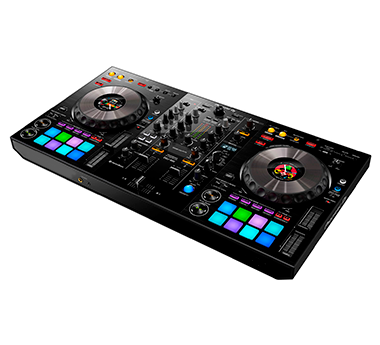
The DDJ-GRV6 features large jog wheels that are ideal for scratching, 8 Performance pads which are positioned above the jogs – just as they are on the flagship CDJ-3000 multi player – and Beat FX from the DJM-A9 in the mixer section.
All this means you can play with a feeling similar to using club-standard equipment, and perform dynamically by combining expressive scratching with pad and effect techniques that are perfect for club sets.
All this means you can play with a feeling similar to using club-standard equipment, and perform dynamically by combining expressive scratching with pad and effect techniques that are perfect for club sets.

Multi-device compatibility: DJ with your PC/Mac, mobile device, and more
You can choose to use the DDJ-GRV6 with not only rekordbox for Mac/Windows but also rekordbox for iOS/Android. With the option of playing via a mobile device, you have freedom to DJ in your preferred style and in a variety of different settings.

Intuitive user experience and sophisticated design
While it includes many advanced features, the matte black finish and ergonomic design mean you can easily find your way around the DDJ-GRV6. Despite the variety of functions, the minimalistic display and indicators offer intuitive access to the functions you need.
And the Groove Circuit, one of the unit’s key features, is cleanly laid out above the Performance Pads with a “step up” in between, ensuring you won’t accidentally touch a jog wheel when you’re using it. This sleek design allows you to get creative in performances that can be as simple or intricate as you like.
And the Groove Circuit, one of the unit’s key features, is cleanly laid out above the Performance Pads with a “step up” in between, ensuring you won’t accidentally touch a jog wheel when you’re using it. This sleek design allows you to get creative in performances that can be as simple or intricate as you like.

Remix performances with Stems FX in Serato DJ Pro
The DDJ-GRV6 is compatible with Serato DJ Pro, which includes a Stems FX feature. Express yourself musically by applying effects such as Roll, Trans, Echo Out, and Delay to the separate Stems of a track – drums, bass, vocal, or melody. Apply the overlay sheet included with the DDJ-GRV6 to change the button labels to Stems FX for ease of use.

Smart Rotary Selector
The new Smart Rotary Selector on the DDJ-GRV6 allows for up/down and left/right tilting as well as conventional rotation and push operations when using rekordbox for Mac/Windows ver. 7.
The left/right tilt enables intuitive navigation through the media browser, tree view, and track list, while the up/down tilt allows fast navigation through playlists and collections, so you can quickly find the track you want, no matter how big your music library is.
The left/right tilt enables intuitive navigation through the media browser, tree view, and track list, while the up/down tilt allows fast navigation through playlists and collections, so you can quickly find the track you want, no matter how big your music library is.

Drum Swap
You can replace the drum parts of the track loaded on the deck, even when it’s playing, with different drum loops at the push of a button. To help you enjoy this feature as soon as you unbox the DDJ-GRV6, you can download a free pack of 40 loops in a variety of genres.

Drum Roll / Trans
Easily create impromptu drum rolls, add fills to transitions, and build up tracks by applying the Roll or Trans effect to drum parts.

Drum Release
Apply Release FX to drum parts to easily create breakdowns.

Capture
Extract only the drum parts of the track loaded on the deck and capture them so you can drop them into another track later.

Discover function
By pressing the Discover button, you can quickly access the Track Suggestion feature, which helps you rediscover old favorites or encounter new songs.
*The Discover function is only available in rekordbox for Mac/Windows.
*The Discover function is only available in rekordbox for Mac/Windows.
Layout based on the latest club-standard DJ gear
The DDJ-GRV6 features large jog wheels that are ideal for scratching, 8 Performance pads which are positioned above the jogs – just as they are on the flagship CDJ-3000 multi player – and Beat FX from the DJM-A9 in the mixer section.
All this means you can play with a feeling similar to using club-standard equipment, and perform dynamically by combining expressive scratching with pad and effect techniques that are perfect for club sets.
All this means you can play with a feeling similar to using club-standard equipment, and perform dynamically by combining expressive scratching with pad and effect techniques that are perfect for club sets.
Multi-device compatibility: DJ with your PC/Mac, mobile device, and more
You can choose to use the DDJ-GRV6 with not only rekordbox for Mac/Windows but also rekordbox for iOS/Android. With the option of playing via a mobile device, you have freedom to DJ in your preferred style and in a variety of different settings.
Intuitive user experience and sophisticated design
While it includes many advanced features, the matte black finish and ergonomic design mean you can easily find your way around the DDJ-GRV6. Despite the variety of functions, the minimalistic display and indicators offer intuitive access to the functions you need.
And the Groove Circuit, one of the unit’s key features, is cleanly laid out above the Performance Pads with a “step up” in between, ensuring you won’t accidentally touch a jog wheel when you’re using it. This sleek design allows you to get creative in performances that can be as simple or intricate as you like.
And the Groove Circuit, one of the unit’s key features, is cleanly laid out above the Performance Pads with a “step up” in between, ensuring you won’t accidentally touch a jog wheel when you’re using it. This sleek design allows you to get creative in performances that can be as simple or intricate as you like.
Remix performances with Stems FX in Serato DJ Pro
The DDJ-GRV6 is compatible with Serato DJ Pro, which includes a Stems FX feature. Express yourself musically by applying effects such as Roll, Trans, Echo Out, and Delay to the separate Stems of a track – drums, bass, vocal, or melody. Apply the overlay sheet included with the DDJ-GRV6 to change the button labels to Stems FX for ease of use.
Smart Rotary Selector
The new Smart Rotary Selector on the DDJ-GRV6 allows for up/down and left/right tilting as well as conventional rotation and push operations when using rekordbox for Mac/Windows ver. 7.
The left/right tilt enables intuitive navigation through the media browser, tree view, and track list, while the up/down tilt allows fast navigation through playlists and collections, so you can quickly find the track you want, no matter how big your music library is.
The left/right tilt enables intuitive navigation through the media browser, tree view, and track list, while the up/down tilt allows fast navigation through playlists and collections, so you can quickly find the track you want, no matter how big your music library is.
Drum Swap
You can replace the drum parts of the track loaded on the deck, even when it’s playing, with different drum loops at the push of a button. To help you enjoy this feature as soon as you unbox the DDJ-GRV6, you can download a free pack of 40 loops in a variety of genres.
Drum Roll / Trans
Easily create impromptu drum rolls, add fills to transitions, and build up tracks by applying the Roll or Trans effect to drum parts.
Drum Release
Apply Release FX to drum parts to easily create breakdowns.
Capture
Extract only the drum parts of the track loaded on the deck and capture them so you can drop them into another track later.
Discover function
By pressing the Discover button, you can quickly access the Track Suggestion feature, which helps you rediscover old favorites or encounter new songs.
*The Discover function is only available in rekordbox for Mac/Windows.
*The Discover function is only available in rekordbox for Mac/Windows.