
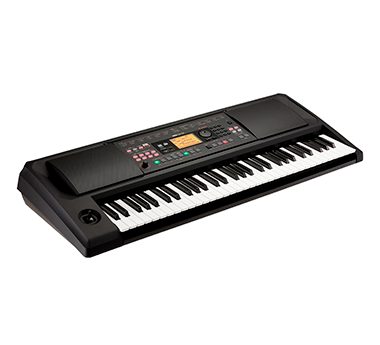


Korg Nautilus 88 AT Workstation
ID: ZM104060
Out of stock
Accumulate discounts for your card


Complete your purchase!
Powering new heights of musical expression
Some features and specs are given below. For more detailed information go to our DOWNLOADS tab or the KORG website please.
Korg Nautilus 88 AT Workstation

RH-3 keyboards are gradually weighted, meaning that the lower notes are heavier, and the higher notes lighter for superb playability. The 61-key NAUTILUS AT features a synthesizer keyboard with a light touch able to reproduce the most complex of performances reliably and with the smoothest feel.
As part of the wider NAUTILUS range, it’s easy to identify aftertouch-equipped models thanks to the AT mark above the NAUTILUS logo on the front panel.

With the DYNAMICS knob, you can instantly control the changes in volume and tone in response to how hard you play the keyboard (velocity); and you can customize this knob in real time to match the keyboard playing feel required for each style and song. Even when playing the same sound, you can turn this knob to get the feeling of playing a completely different sound. By finding just the right setting for your playing style, you'll uncover even more of the possibilities that the NAUTILUS offers.
When you activate the DYNAMICS knob and turn it to the left, the keyboard responds more softly to your playing, giving you a wide range of dynamics. This allows for delicate, expressive playing when accompanying a piano solo or vocals, which directly reflects the dynamics of your performance. On the other hand, turning the knob to the right gives a stronger, more flat dynamic response. This brings out the sound when you’re playing in a band or ensemble, which works best when performing with a more even feel.

NAUTILUS can organize all of the resources you need to get through a song—or a set—using the Set List mode. Using the Set List mode, the TouchView display can host 16 color-coded touch-screen buttons; each one can instantly call up the appropriate Preset, Combination, or Sequence—regardless of mode!
You can also select different button colors, such as when you want to change the colors within a song while playing live. This is a powerful feature for situations that require quick and accurate control. The Set List mode even adds a nine-band graphic EQ, allowing the overall tone to be tweaked to match the venue.

NAUTILUS features a sequencer/recording section that offers both 16 MIDI tracks plus 16 audio tracks; a great resource for putting together a dazzling performance or a brilliant production. MIDI sequencing makes it easy to capture ideas, inspiration, and pro-quality phrases using the Drum Track, or RPPR (Realtime Pattern Play/Recording) functions.
The 16-track audio recorder simultaneously captures up to four tracks of 16-bit/24-bit uncompressed data at a sampling rate of 48 kHz. Play along with recorded tracks, add effects, and then resample the NAUTILUS itself and place the resampled WAV files directly in a track. When polishing your tracks, feel free to use mixer automation and editing functions such as copy, paste, and normalize to get the results you want.


RH-3 keyboards are gradually weighted, meaning that the lower notes are heavier, and the higher notes lighter for superb playability. The 61-key NAUTILUS AT features a synthesizer keyboard with a light touch able to reproduce the most complex of performances reliably and with the smoothest feel.
As part of the wider NAUTILUS range, it’s easy to identify aftertouch-equipped models thanks to the AT mark above the NAUTILUS logo on the front panel.
With the DYNAMICS knob, you can instantly control the changes in volume and tone in response to how hard you play the keyboard (velocity); and you can customize this knob in real time to match the keyboard playing feel required for each style and song. Even when playing the same sound, you can turn this knob to get the feeling of playing a completely different sound. By finding just the right setting for your playing style, you'll uncover even more of the possibilities that the NAUTILUS offers.
When you activate the DYNAMICS knob and turn it to the left, the keyboard responds more softly to your playing, giving you a wide range of dynamics. This allows for delicate, expressive playing when accompanying a piano solo or vocals, which directly reflects the dynamics of your performance. On the other hand, turning the knob to the right gives a stronger, more flat dynamic response. This brings out the sound when you’re playing in a band or ensemble, which works best when performing with a more even feel.
NAUTILUS can organize all of the resources you need to get through a song—or a set—using the Set List mode. Using the Set List mode, the TouchView display can host 16 color-coded touch-screen buttons; each one can instantly call up the appropriate Preset, Combination, or Sequence—regardless of mode!
You can also select different button colors, such as when you want to change the colors within a song while playing live. This is a powerful feature for situations that require quick and accurate control. The Set List mode even adds a nine-band graphic EQ, allowing the overall tone to be tweaked to match the venue.
NAUTILUS features a sequencer/recording section that offers both 16 MIDI tracks plus 16 audio tracks; a great resource for putting together a dazzling performance or a brilliant production. MIDI sequencing makes it easy to capture ideas, inspiration, and pro-quality phrases using the Drum Track, or RPPR (Realtime Pattern Play/Recording) functions.
The 16-track audio recorder simultaneously captures up to four tracks of 16-bit/24-bit uncompressed data at a sampling rate of 48 kHz. Play along with recorded tracks, add effects, and then resample the NAUTILUS itself and place the resampled WAV files directly in a track. When polishing your tracks, feel free to use mixer automation and editing functions such as copy, paste, and normalize to get the results you want.
Related
Recommendations
| 5 stars | 0% | |
| 4 stars | 0% | |
| 3 stars | 0% | |
| 2 stars | 0% | |
| 1 star | 0% |